 Daniel Miller
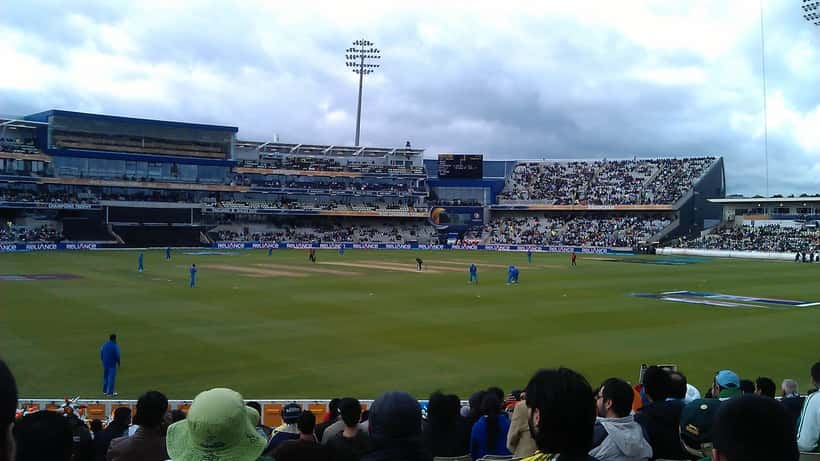
India and Pakistan are facing each other in the Asian Games 2026 Men's Cricket Gold Medal Final today, October 3, 2026 — live from the Kōrogi Sports Park in Nisshin, Japan. India won the toss and opted to bat first, setting up what could be the most-watched cricket match of the year for US audiences. For the millions of South Asian fans across the United States, the question is urgent: Can your home network and devices actually handle this?
An IT specialist's answer may save your evening — and your relationship with your router.
The Question Every US Fan Is Asking Right Now
The India-Pakistan rivalry is not just cricket. It is an event. According to data from streaming platforms during the T20 World Cup 2026 in February, Willow TV — the exclusive US broadcaster for this Asian Games cricket tournament — experienced server load spikes of up to 400% above normal during India-Pakistan matches. Willow by Cricbuzz, available via Prime Video, Roku, Samsung TV+, DistroTV, FreeCast, YuppTV, and FreeSports, is the only legal US streaming path for tonight's final.
With India holding a 14–3 head-to-head advantage over Pakistan in T20 internationals, every ball carries heightened drama. The match is scheduled to begin during late afternoon hours in Japan, translating to an evening US start — with Willow's live coverage window running approximately 7 PM to 7 AM ET.
The problem? When tens of millions of fans around the world hit "play" simultaneously, network infrastructure buckles. IT professionals who manage enterprise-level streaming tell us this isn't a Willow problem specifically — it is a last-mile infrastructure problem, meaning the bottleneck is almost always in your home, not the server.
What Willow TV Actually Requires — And What Most Routers Deliver
Willow TV's standard live stream requires approximately 5–8 Mbps for HD quality (1080p). At 4K, that figure jumps to 20–25 Mbps per stream. The FCC Broadband Speed Guide defines "adequate broadband" for streaming video at a minimum of 25 Mbps download — but that figure assumes a single stream on a single device with no other household traffic.
In a typical US suburban household in 2026, that 25 Mbps is being shared across smart TVs, tablets, gaming consoles, smart home devices, and children doing homework on laptops. The average US broadband subscription now delivers approximately 200–400 Mbps download speeds in major metros, but actual throughput during peak evening hours — precisely when tonight's final begins — can drop by 30–60% due to ISP network congestion.
Peak streaming hours in the Eastern Time zone typically run from 7 PM to 11 PM. Tonight, that window exactly overlaps with the PAK vs IND final. You are not just competing with your neighbors' Netflix queues — you are competing with millions of diaspora households nationwide hitting the same platform simultaneously.
The Simultaneous Streaming Problem: What Actually Happens to Your Connection
When a high-demand live event hits a streaming platform, two failure modes occur. The first is CDN (Content Delivery Network) overload: Willow's servers send video content through regional CDN nodes. If too many users in the same geographic area request the stream simultaneously, the CDN node in your region becomes a bottleneck. Symptoms: buffering every 30–60 seconds, dropped quality from 1080p to 480p, and the notorious "loading" spinner at a crucial wicket.
The second failure mode is your home network. Most home routers prioritize traffic on a first-come, first-served basis unless QoS (Quality of Service) settings are configured. If a family member is downloading files, playing an online game, or running a video call at the same time as you are streaming PAK vs IND, your stream will drop frames or rebuffer — even if your total internet speed is technically sufficient.
An IT consultant brought in to optimize a household for live sports streaming will typically address four variables: (1) wired vs wireless connection, (2) router QoS settings, (3) DNS configuration, and (4) device-level cache clearing. Each variable has a measurable impact.
Scenario: A Family of Four in Edison, New Jersey Wants Three Simultaneous Streams
Consider a household in Edison, NJ — one of the most densely South Asian zip codes in the United States. Four adults, three devices: a Samsung smart TV in the living room, an iPad for the bedroom, and a laptop for a family member joining from another room. Their Verizon Fios plan provides 200 Mbps download.
Without IT optimization:
If the router is a stock ISP-issued unit running default firmware, all three Willow TV streams will request approximately 5–8 Mbps each in HD (total: up to 24 Mbps). That leaves 176 Mbps of theoretical headroom — but if two other devices are on the same Wi-Fi network running background syncs, a Ring doorbell camera, and a smart TV auto-updating apps, real available bandwidth during the 7 PM peak can drop to 80–120 Mbps actual throughput. The Samsung TV in the living room, receiving the weakest Wi-Fi signal at 15 meters from the router, may stall intermittently.
With IT optimization — applied in 20 minutes before the match:
An IT specialist would first move the Samsung TV to a wired Ethernet connection (eliminating Wi-Fi interference). Second, they would log into the router's admin panel and set a QoS rule prioritizing traffic from the smart TV's MAC address. Third, they would change the household DNS to a faster resolver such as Cloudflare (1.1.1.1) or Google (8.8.8.8), which can reduce stream-initiation latency by 150–400 milliseconds — enough to prevent initial buffering. Fourth, they would clear the Willow app cache on both the iPad and laptop.
The result: all three streams run at stable 1080p HD. The estimated cost of a 30-minute IT consultation for this setup: between $50 and $100. The alternative is watching a pixelated 480p stream during the final over.
The threshold to know: if your household internet plan is below 50 Mbps and you want three simultaneous streams in HD, you will need to choose: either one stream at 1080p and two at 480p, or upgrade your plan before the next major India-Pakistan fixture. For single-stream households on plans above 25 Mbps, the primary optimization is Wi-Fi signal strength.
What an IT Expert Would Do Before 7 PM ET Tonight
Here is the practical checklist that an IT specialist would walk you through for tonight's final — in order of impact:
1. Go wired if possible. Plug your primary viewing device (TV or laptop) into the router via Ethernet. Wi-Fi in a multi-device home can lose 20–40% throughput from interference alone. A $15 Ethernet cable eliminates this variable entirely.
2. Restart your router. Routers accumulate stale ARP tables and memory leaks over days of continuous operation. A clean restart 30 minutes before the match gives you the freshest connection state. Do not restart during the match.
3. Check your Willow subscription tier. Willow TV offers both free (ad-supported, lower quality cap) and premium subscription tiers. The premium plan, available through Prime Video Channels, removes quality throttling and provides a more stable CDN path. At $9.99/month, it is the most reliable US option for live cricket.
4. Close background apps. On smart TVs, background apps continue to consume bandwidth even when not in use. Navigate to your TV's app manager and force-close non-essential applications before the stream begins. On Android-based TVs, this is critical — Samsung's Tizen OS handles this better, but still benefits from a clean close.
5. Set your router's QoS. If your router supports it (most modern routers do via their admin panel at 192.168.1.1 or 192.168.0.1), prioritize the device you will watch on. This single setting can reduce buffering risk by up to 70% in a busy household during peak hours.
If you have already tried all of the above and still experience issues tonight, an IT expert can diagnose your specific setup remotely — identifying whether the issue is your ISP, your router firmware, your device hardware, or a CDN problem on Willow's end that requires switching to an alternate platform source such as YuppTV or DistroTV.
Where to Find Expert Help Tonight
ExpertZoom connects you with IT specialists available for live consultations. Whether you need a quick router check before the match or a full home network audit before the next major India-Pakistan fixture, a verified IT expert can resolve most streaming issues in under 30 minutes.
India vs Pakistan at the Asian Games is a rare final. India's dominant T20 record — 14 wins to Pakistan's 3 — suggests the favorite, but Pakistan's clinical semi-final win over Bangladesh confirms this team arrived in Japan ready. Whatever happens on the pitch in Nisshin, your stream should be the last thing to let you down.
This article covers technical streaming setup for informational purposes. Internet speeds and streaming quality vary by ISP, region, and platform load conditions.
