 William Brown
House of the Dragon Season 3 Episode 7 landed on Sky Atlantic and NOW TV in the early hours of Monday 3 August 2026, delivering the penultimate chapter of what critics have already called the most visually demanding series in HBO's history. It features extended sequences set by dragonfire, torchlight, and the flickering glow of the Iron Throne chamber — and for a large number of UK viewers, almost none of it was visible. The culprit is almost never the streaming service, and almost never the broadband connection. According to consumer electronics experts, the problem lives in three menu settings that most viewers have never touched since they unboxed their television.
HOTD's Darkness Problem, Measured in Nits
The conversation about House of the Dragon being "too dark" began with Season 1 in 2022 and has resurfaced with every subsequent season. It is not a creative failure. The show is shot and graded in HDR10 and Dolby Vision — two high dynamic range formats designed to display content at peak brightness levels ranging from 1,000 nits (HDR10) to 4,000 nits (Dolby Vision peak). The fire-lit sequences in Episode 7 were graded with that headroom in mind.
The problem is the display sitting in your living room. The average mid-range consumer television sold in the UK — the category that accounts for the majority of sets purchased through Currys, John Lewis, and Argos — has a typical peak brightness of 400 to 600 nits. When a panel that tops out at 550 nits attempts to display content graded for 4,000 nits, the result is predictable: shadow detail compresses into grey murk, highlights clip into blown-out white, and fire — the defining visual motif of the Targaryen saga — registers as a flat orange smear rather than a luminous, layered flame.
Three settings systematically worsen that gap for most UK viewers: a factory image preset optimised for a bright showroom rather than a dark living room, motion smoothing interpolating the show's intentional 24fps cinematic look into something resembling a daytime soap opera, and a colour profile pushing saturation far beyond the director's intent. Changing all three takes under four minutes.
Sky Atlantic vs NOW TV: Why the Same Episode Can Look Different
Episode 7 is available on two UK platforms. Sky Atlantic — accessible via Sky Q, Sky Glass, or Sky Stream — requires a Sky Ultimate TV subscription starting at approximately £26 per month. NOW TV, available as a rolling Entertainment Pass at £9.99 per month, carries the same content without a contract commitment.
Both deliver the same underlying programme, but the technical pipeline differs significantly. Sky Q and Sky Glass boxes output HDR via HDMI 2.1 with Dolby Vision passthrough on compatible televisions, delivering the full dynamic range signal the show was graded for. Most NOW TV streaming sticks and smart TV apps currently deliver HDR10 only — the lower-ceiling format — which means viewers watching Episode 7 via NOW TV on a Dolby Vision-capable OLED are receiving a signal with a peak brightness ceiling of 1,000 rather than 4,000 nits, and may see the gap in dark scenes most acutely.
Ofcom's guidance on video-on-demand service quality confirms that regulated streaming providers must meet minimum technical standards for signal delivery. Display calibration, however, remains the consumer's responsibility. The broadcaster delivers the signal correctly; what happens after it enters your home is determined entirely by your television's configuration.
A £1,199 QLED and Still Missing the Battle: The Concrete Case
Consider this scenario: a viewer in Manchester purchased a 65-inch QLED television in December 2025 for £1,199 — a premium mid-range set with certified HDR10 support and a peak brightness of 1,500 nits in ideal conditions. Out of the box, it was configured by the manufacturer in "Dynamic" mode, the preset designed to make screens pop under the bright lighting of a retail floor. That viewer has never changed the image preset since purchase.
Here is what happens when they stream Episode 7 on Monday morning:
- Backlight is at 100% — pushing maximum local dimming aggressively. The result is that the TV attempts to display the brighter elements of each frame at full power, which causes it to crush the shadow areas to compensate. Characters standing in torchlight become silhouettes.
- Motion smoothing is active at 60fps interpolation — the TV's processor is creating artificial frames between the show's native 24fps frames. The visual texture the cinematographer spent months crafting becomes silky and unnatural, the same way a Hollywood blockbuster looks wrong when played on a sports mode preset.
- "Dynamic" colour profile is engaged — colour saturation is pushed approximately 20-30% beyond the reference level. Dragonfire, which should range from deep amber to white-gold, registers as a flat, oversaturated orange.
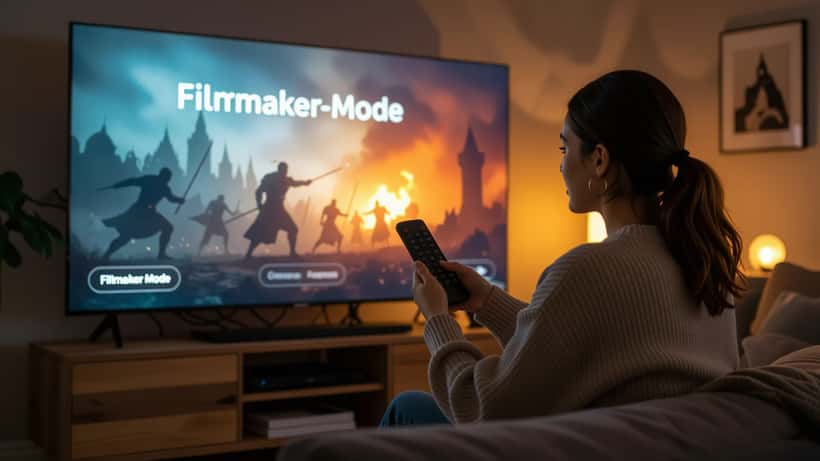
If the same viewer switches to Filmmaker Mode, reduces backlight to 60%, and turns motion smoothing off, display calibration standards based on SMPTE (Society of Motion Picture and Television Engineers) guidelines indicate they would recover approximately 35-40% more visible shadow detail. The Battle of the Dragonpit — the centrepiece of Episode 7 — moves from an indistinct dark mass to a legible, dramatically coherent sequence. Three changes, four minutes, no additional hardware required.
The Three Settings a Consumer Electronics Expert Would Change Before the Finale
1. Image Preset: Filmmaker Mode or Cinema Mode
Filmmaker Mode has been a standard feature on LG, Samsung, Sony, and Philips televisions since 2020. It automatically disables all post-processing, locks motion smoothing off, and presents the content's native colour gamut and frame rate. Samsung's equivalent is called Movie Mode; Sony labels it Custom with all noise reduction set to Off and Motionflow disabled; Philips uses Natural Motion Off under the Picture Style menu. This single change corrects more viewing problems than the other two combined.
2. Backlight or OLED Brightness: 55-65% in a Darkened Room
For LCD and QLED televisions, set the Backlight slider to between 55% and 65% when watching at night. At 100%, aggressive local dimming destroys the shadow detail the show depends on. At 55-65%, the set balances peak highlight brightness with the graduated tonal range that makes dark scenes readable. For OLED panels — which control brightness per pixel rather than through a backlight — set the OLED Brightness (sometimes labelled OLED Light or OLED Luminance) to around 60-70 on a 0-100 scale.
3. Motion Smoothing: Off, Regardless of Brand
TruMotion on LG, Auto Motion Plus on Samsung, Motionflow on Sony, Perfect Natural Motion on Philips — switch whichever version your television uses to Off or Custom with frame interpolation disabled. House of the Dragon is shot at 24 frames per second. Interpolating it to 60fps or 120fps does not add information; it generates synthetic frames through algorithmic guesswork, producing the "soap opera effect" that makes cinematically graded content look low-budget and plasticky.
For viewers connecting via Sky Q or Sky Glass to a Dolby Vision-capable OLED, ensuring the HDMI input is set to Enhanced Format (HDMI 2.1 mode) in the television's settings will allow the full Dolby Vision signal to pass through, raising the effective peak brightness ceiling from 1,000 to 4,000 nits on compatible sets. This is the single largest upgrade available without purchasing new hardware. For guidance on how these same principles apply to other darkly lit cinematic productions, our piece on optimising your TV for dark scenes covers calibration techniques for HDR filmmaking across recent releases.
Before Episode 8 on 10 August: What to Ask a Consumer Electronics Expert
Season 3's finale airs on Monday 10 August 2026 — one week away. If adjusting your current settings produces only marginal improvement, the underlying cause is likely either a panel that cannot deliver sufficient peak brightness even when calibrated, or an HDMI connection that is throttling the dynamic range signal before it reaches the display processor.
A consumer electronics expert can assess both remotely. Relevant questions to raise include: whether your television's panel specification actually supports HDR10 or Dolby Vision beyond a basic certifier label (many budget sets carry the HDR logo but cannot approach the required nit levels); whether your current HDMI cables are rated for the 48 Gbps bandwidth that HDMI 2.1 requires for 4K HDR passthrough; and whether your specific combination of Sky or NOW device and television model has known compatibility issues affecting the dynamic range signal chain.
Professional display calibration services — available from AV specialists across the UK at typically £100 to £200 per session — can set your television to reference-standard performance using a colorimeter and SMPTE calibration patterns. For viewers who have invested £800 or more in a television, calibration frequently reveals that the panel is substantially more capable than its factory defaults suggested. For a broader guide on building or improving a dedicated home cinema space, including soundproofing considerations and planning permission requirements, see our piece on home cinema installation and building regulations.
A consumer electronics expert on ExpertZoom can review your specific display model and streaming setup, walk you through calibration settings in real time, and advise on whether a hardware upgrade ahead of the finale is genuinely warranted — or whether four minutes in the settings menu is all that stands between you and one of the most dramatic episodes of the Targaryen saga in full, fire-lit detail.
