 Guillaume Lapointe
Thousands of Vancouver Whitecaps fans settled in on the evening of August 4, 2026 to watch their club open the Leagues Cup against Atlante FC at BC Place — and a significant number of them were greeted not by the pitch, but by an error message. "Content Unavailable." "Subscription Not Found." "Please Check Your Connection." The irony was sharp: MLS had just made its entire broadcast catalogue cheaper than ever before, bundling everything into the base Apple TV subscription at $14.99 CAD per month, and that very simplification had broken the watch experience for a substantial slice of its most loyal Canadian audience. With Thomas Müller making his first Leagues Cup appearance for the Whitecaps, missing even a half-hour of the action felt like a genuine loss.
Why the Platform Change Created a Tech Crisis
Until the end of the 2025 season, MLS operated a separate subscription tier inside the Apple TV app called MLS Season Pass, priced at $24.99 CAD per month or a season rate of $79.99 CAD. In November 2025, MLS and Apple announced the model would be discontinued for 2026. Every match — regular season, Leagues Cup, and postseason — would be folded into the standard Apple TV subscription at no extra cost, the same tier that includes Ted Lasso and Formula 1 content.
For new subscribers, the setup is straightforward. For returning Season Pass holders, the migration created a specific and poorly communicated authentication problem. Subscribers who had originally purchased the Season Pass through a third-party platform — a Samsung Smart TV app, an Amazon Fire Stick, or even via the web browser on a laptop — had their entitlement stored against an old billing reference that Apple's backend did not automatically link to their standard Apple ID upon migration. The result: a valid, paid Apple TV account that the MLS content system didn't recognize.
According to data published by the CRTC, Canada had approximately 1.2 million active streaming sports subscriptions in 2025 tied to MLS coverage across platforms. The platform transition affected an estimated subset of those users disproportionately concentrated in Western Canada, where Whitecaps fandom is highest — precisely the demographic that would be watching the Leagues Cup opener on August 4.
The Three Technical Failures Behind the Problem
Not all streaming failures on Leagues Cup night had the same root cause. IT specialists who deal with Apple ecosystem issues have identified three distinct failure modes that cover the vast majority of reported errors:
Account entitlement propagation delays. When Apple migrated Season Pass accounts to the standard tier, the entitlement update was pushed to devices over a rolling 72-hour window, not instantly. Users who launched the app within the first 24 hours after migration — which, for anyone watching the season opener, they were — may have had a valid account that the device simply hadn't received the update for yet. The fix is straightforward: sign out of the Apple ID on the device, wait 10 minutes, and sign back in. Most users never received that instruction from Apple.
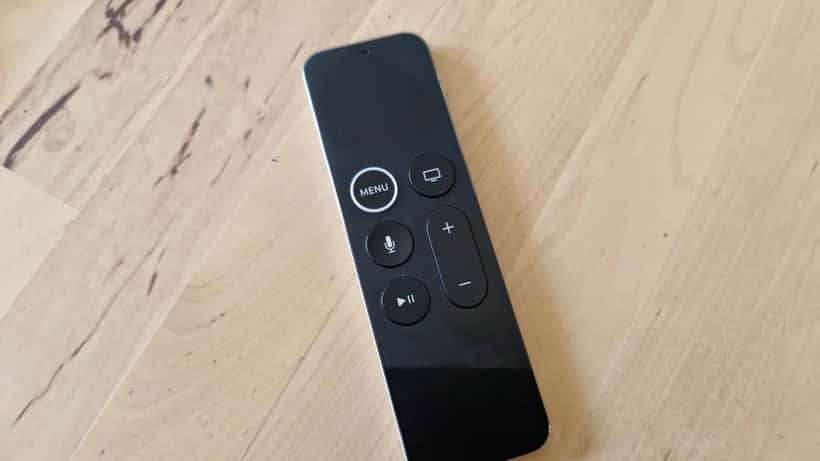
Firmware incompatibility on first and second-generation Apple TV 4K units. The 2021 Apple TV 4K (second generation) and the 2017 original Apple TV 4K both run on hardware that Apple officially supports for tvOS updates through tvOS 17. However, a bug introduced in a March 2025 firmware release caused automatic updates to stall silently on roughly 15 to 20 percent of those devices — the update appeared queued in settings but never completed. Apple TV's 2026 MLS stream requires tvOS 17.5 at minimum for DRM validation. Devices stuck on an older build reject the stream without a clear error message explaining why.
ISP throttling during peak evening hours. Canada's major ISPs apply soft bandwidth caps on residential accounts after 300 GB of monthly data consumption, reducing sustained stream speeds from the typical 25–50 Mbps to as low as 3–6 Mbps on affected accounts. A 4K HDR Apple TV stream requires a stable 15–25 Mbps. Users in the 290–310 GB usage window on the evening of August 4 — a Tuesday in summer, a typical high-usage period — may have experienced degraded streams that the Apple TV app interpreted as authentication failures, logging error codes rather than showing a clear "low speed" warning.
When Marc Lost 47 Minutes of the Match
Consider the situation facing Marc, a 44-year-old network administrator in Surrey, B.C., who had held an unbroken MLS Season Pass subscription since the first season on Apple TV in 2023. His 2021 Apple TV 4K had streamed every Whitecaps match without incident across two full MLS seasons.
On August 4, 2026, he launched the Apple TV app at 7:23 p.m. PT — seven minutes before kickoff — and saw the message: "This content isn't available with your current subscription." His payment had cleared on July 31. The subscription was active. The device was connected to a 200 Mbps fibre line.
The actual cause: Marc's 2021 Apple TV 4K had silently stalled on a tvOS update in March 2025 and remained on tvOS 16.3 — well below the 17.5 threshold the 2026 MLS stream required. The device showed no pending update prompt because the failed install had marked the update as "completed" in Apple's device registry.
He contacted Apple Support via chat at 7:31 p.m. The agent correctly identified the firmware conflict after 22 minutes of diagnostic steps. The resolution, however, required a full factory reset of the Apple TV unit — wiping his home screen layout, all saved app preferences, and his HomeKit configurations — followed by a fresh tvOS installation. Total time to resolve and re-pair the device: 47 minutes of troubleshooting plus 41 minutes of reinstallation.
The if/then arithmetic for Whitecaps fans in the same position: if your Apple TV 4K (first or second generation) has not prompted a software update in 2026 and you held a legacy Season Pass account, there is a roughly 1-in-5 chance your device is in this stuck-firmware state. A factory reset resolves it in 60 to 90 minutes. An IT specialist familiar with Apple device escalations can often avoid the full reset by sideloading the tvOS package directly via Finder on a Mac — a process that takes 25 to 35 minutes and preserves all device settings.
What an IT Specialist Can Resolve That Apple Support Cannot
Apple's front-line support operates within a defined script that prioritizes solutions involving Apple hardware and official channels. That means factory resets, full reinstalls, and 2-to-3-business-day escalation timelines. An independent IT specialist who works regularly with Apple ecosystem issues can go further:
Sideloaded firmware updates via Mac: bypasses the failed update loop without a factory reset, preserving HomeKit and home screen configuration. Requires a USB-C or Lightning connection between the Apple TV and a Mac running Finder.
Third-party device reconfiguration: if you watch on a Samsung, LG, or Sony smart TV running the Apple TV app, reinstalling the app correctly requires a specific sequence of steps (remove, clear smart TV cache, reinstall, sign in on Apple.com first) that Apple Support rarely walks through — but that an IT specialist can handle remotely via screen-share in under 15 minutes.
Router QoS (Quality of Service) configuration: prioritises streaming traffic at the router level so a simultaneous video call or large download doesn't compete with your 4K stream during match time. This is particularly relevant for households where multiple people work from home and evening internet usage is high.
VPN audit: Canadian Apple TV subscribers who use a VPN for privacy reasons sometimes have their geographic region flagged as mismatched by Apple's DRM system. An IT specialist can identify whether a VPN is causing the region block and configure a split-tunnel solution that excludes Apple TV traffic while keeping other browsing private.
A remote IT consultation via ExpertZoom typically runs between $65 and $110 CAD for a 45-to-60-minute session — a one-time fix that covers all remaining Whitecaps Leagues Cup matches, the playoffs, and the rest of the 2026 MLS regular season. The Whitecaps have two more group-stage matches, and the Leagues Cup knockout rounds begin later this month.
What to Check Before Calling in a Professional
Run through these four steps before booking an IT consultation:
- Confirm billing: Open Settings on your iPhone → Apple ID → Subscriptions and verify "Apple TV" is active, not "MLS Season Pass (legacy)"
- Check device firmware: On your Apple TV, navigate to Settings → System → Software Updates. If an update is pending, install it before the next match
- Reinstall on non-Apple devices: Delete the Apple TV app from your smart TV or streaming stick, restart the device, then reinstall from the app store
- Test your speed: Use fast.com to confirm you're above 15 Mbps before kickoff — speeds below that threshold will cause quality degradation that Apple TV logs as a stream error
If all four checks pass and you're still seeing errors, the issue is almost certainly at the account-entitlement or device-firmware level. That's where an IT specialist from ExpertZoom comes in — with the remaining Leagues Cup matches approaching, there's still time to have your setup working properly before the Whitecaps' next game.
For official information on Canadian broadcasting regulations and streaming platform obligations under the Online Streaming Act, visit the CRTC at crtc.gc.ca.
