 Ryan MacDonald
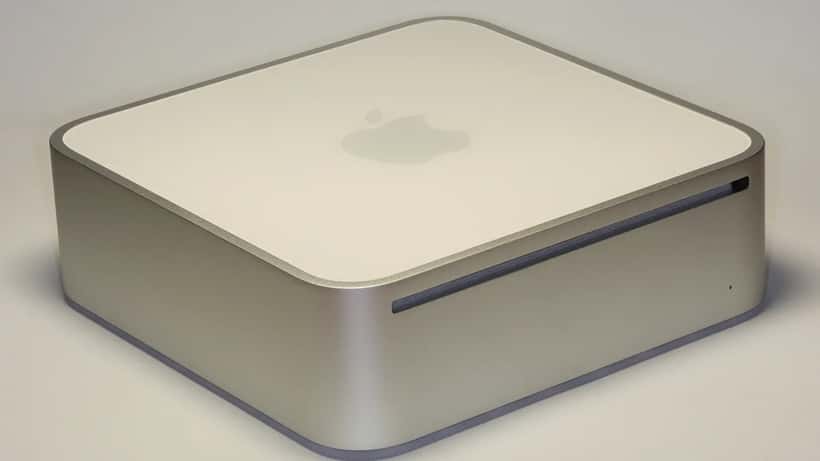
On August 25, 2026, Apple announced the new Mac mini lineup — now powered by the M6 and M5 Pro chips — with Canadian preorders opening the same day and deliveries scheduled for September 22. What looks like a routine hardware refresh becomes a surprisingly complex business decision when you realize that a fully configured Mac mini can now exceed $10,000 in Canada, up from roughly $6,000 in 2024. For Canadian businesses, freelancers, and creative professionals, the question isn't just "is the new Mac mini faster?" — it's "which version, if any, actually fits your workflow, and what happens if you get that call wrong?"
What Apple Changed: The New Specs and Canadian Prices
The 2026 Mac mini ships in two distinct configurations separated by a meaningful performance — and price — gap. According to Apple's Canadian newsroom, the base M6 model starts at $1,249 CAD ($1,109 for students and educators), while the M5 Pro version begins at $2,399 CAD ($2,259 for education).
The M6 base model packs a 12-core CPU and 12-core GPU — two more cores each than the M4 it replaces — with up to 32GB of unified memory. Apple notes that every GPU core now includes a Neural Accelerator, a first for the Mac mini family, pushing on-device AI performance up to four times faster than the M4. Both new models move to Wi-Fi 7 and Bluetooth 6, with 2.5Gb Ethernet now standard across the lineup (10Gb remains an available upgrade). The base M6 keeps three Thunderbolt 4 ports.
The M5 Pro is a substantially different machine. It offers up to an 18-core CPU, a 20-core GPU with third-generation ray tracing support, and up to 64GB of unified memory at 307GB/s of bandwidth. Thunderbolt 5 ports replace Thunderbolt 4, and Apple has confirmed that multiple M5 Pro Mac minis can be linked via Thunderbolt 5 to pool compute for running large AI models entirely on-device — keeping data off cloud infrastructure entirely.
The Canadian Price Reality: Why the Gap From 2024 Matters
The price increase for fully loaded configurations deserves a clear-eyed look. According to iPhone in Canada reporting on August 25, 2026, a maxed-out Mac mini now surpasses $10,000 CAD — a jump of approximately 67% compared to the equivalent configuration in 2024 at roughly $6,000. Part of that gap reflects genuine chip advancement; the M5 Pro and M6 represent real generational leaps over M2-era hardware. But Canadian buyers also face foreign exchange pressure and tariff-related pricing that make Apple hardware consistently more expensive than in the US market.
For individual consumers, this raises a simple question: is the upgrade worth it? For businesses managing a fleet of machines or planning multi-year infrastructure, the calculation is far more nuanced — and the cost of getting it wrong runs into thousands of dollars.
Three Questions Every Canadian Buyer Should Answer First
IT specialists who work with small and mid-sized businesses across Canada are already fielding calls about the new Mac mini. Their advice consistently circles back to three questions before any purchase decision.
What is the primary workload? The M6 handles office productivity, Final Cut Pro, Logic Pro, and standard development environments comfortably. The M5 Pro becomes relevant when the machine will run simultaneous 4K or 8K video renders, machine learning inference, large-scale data processing, or workloads that consistently push memory bandwidth beyond 150GB/s.
Is your team growing or shifting toward local AI processing? The Thunderbolt 5 clustering capability on the M5 Pro is not a marginal feature. For businesses that want to run large language models or image generation pipelines locally — to keep client data away from third-party cloud servers — two linked M5 Pro machines may deliver better ROI than a single maxed-out unit. This changes the investment math significantly: a pair of $2,399 base M5 Pro units with Thunderbolt 5 clustering can pool compute in ways that a $10,000 single machine cannot replicate for distributed workloads.
What is your current hardware actually doing right now? Activity Monitor on macOS shows real-time memory pressure and CPU load. Users running M1 or M2 chips who regularly hit memory pressure warnings will see dramatic gains from the M6. Users on M4 hardware purchased in 2024 face a harder case — the performance delta, while real, may not justify the 67% price premium in most professional contexts.
A Toronto Studio's Real Numbers: When $1,249 Becomes $9,597
Consider a five-person graphic design and video production studio in Toronto. They currently run three 2023 M2 Pro Mac minis, each purchased at approximately $2,499 CAD. Their workflow includes 4K client video editing in Adobe Premiere, motion graphics in After Effects, and increasingly, AI upscaling tools that require sustained GPU memory. They've noticed render queues slowing down over the past six months.
If all three machines are replaced with the base M5 Pro configuration ($2,399 CAD each), the total outlay reaches $7,197 CAD before taxes. If the studio opts for the 48GB unified memory tier — the configuration that handles simultaneous 4K editing and AI upscaling without memory pressure — the cost climbs to approximately $3,199 per unit, or $9,597 CAD total.
Here is the if/then logic an IT specialist would apply to this decision: if Activity Monitor shows those machines regularly exceeding 16GB of unified memory pressure during active sessions, then the upgrade to M5 Pro with 48GB RAM is likely to produce a measurable reduction in render times — Apple benchmarks indicate up to 30% faster sustained CPU performance compared to the M2 Pro, and memory-bound tasks (such as AI upscaling) benefit disproportionately from the higher bandwidth. If the machines are comfortably below 16GB during typical production sessions, then the studio would see diminishing returns and could defer the upgrade cycle to the next generation without meaningful productivity loss.
An IT consultant can run a comprehensive memory and CPU load audit on existing machines in under two hours — typically for $150 to $300 CAD — and produce a configuration recommendation that prevents the studio from spending $3,600 more than they need, or from under-specifying hardware that bottlenecks within 18 months. For a studio already stretched by the price increase since 2024, that audit may be the most cost-effective tech purchase they make this quarter.
For Canadian businesses that are also navigating federal AI infrastructure investment and local compute planning, the Mac mini's on-device AI capabilities connect directly to a broader strategy question — one where IT specialists are increasingly being consulted before hardware commitments are made.
Who Should Upgrade Now — and Who Should Wait
Based on specifications and current Canadian pricing, here is a practical framework:
Upgrade now if you: run M1 or earlier hardware with frequent memory pressure; need Thunderbolt 5 for high-speed external NVMe storage or multi-machine clustering; are building local AI inference pipelines to avoid cloud data exposure; or produce professional content in Final Cut Pro, DaVinci Resolve, or Logic Pro at the 4K and above level.
Consider waiting if you: run an M3 or M4 Mac mini with adequate memory headroom in daily use; are a general business user with no intensive GPU or machine learning demands; are price-sensitive to the significant premium increase relative to 2024; or need only one or two machines, where the risk of misspecification is limited and a refurbished M4 from Apple's Canadian certified refurbished store may offer better value.
For anyone replacing older hardware, the decision about whether to repair or upgrade a current Mac is a conversation worth having with an IT professional before signing off on any preorder.
Your Next Step Before the September 22 Launch
The 2026 Mac mini's configuration range — from the $1,249 entry model to $10,000-plus fully loaded — is deliberately wide. Apple designs it that way. An IT specialist does three things that most buyers cannot do efficiently alone: audit existing infrastructure to identify real versus perceived bottlenecks, match workload requirements to specific memory and GPU tiers, and plan a deployment schedule that minimizes disruption across a team.
For Canadian businesses, the difference between a well-advised configuration and a mismatched one can mean several thousand dollars in waste, or a machine that underperforms within 18 months. ExpertZoom connects you with certified IT specialists across Canada who can assess your workflow, recommend the right Mac mini configuration, and help you plan the transition — before preorders close on September 22 and before your budget decision locks in.
