 William Brown
Apple TV+ dropped Silo Season 3 today — July 3, 2026 — and the 10-episode dystopian thriller is already one of the most-searched TV events this summer in the UK. But before you sink into Juliette Nichols' underground saga, there's a question millions of British viewers are quietly dealing with: can your home setup actually handle it?
What's New in Silo Season 3
The third season of Silo, starring and executive-produced by Rebecca Ferguson, launches with its first episode today on Apple TV+. New episodes drop every Friday through September 4, 2026 — ten weeks of underground tension. Already renewed for a fourth and final season, the show has become Apple TV+'s prestige drama flagship, drawing comparisons to HBO's biggest productions.
Season 3 significantly expands the story, adding a brand-new timeline that reveals the origin of the underground society alongside the present-day storyline. For fans of the series, that means more visual complexity, larger scale — and higher demands on your streaming hardware.
Why Silo Is a Real Test of Your Home Setup
Silo is produced in 4K HDR with Dolby Vision and Dolby Atmos audio. On paper, that means stunning visuals and cinema-quality sound. In practice, it means your equipment needs to receive and decode those formats correctly — and your broadband has to keep up.
The good news: most UK homes now have sufficient speeds. According to Ofcom's Connected Nations 2025 report, the average UK maximum download speed reached 285 Mbps in 2025 — well above the 15–25 Mbps Apple TV+ recommends for 4K streaming. But raw speed is only part of the equation.
Buffering, pixelation, and audio drop-outs are typically caused by internal network issues, not the broadband connection itself. Common culprits include:
- A router more than three years old that can't handle simultaneous 4K streams
- Wi-Fi dead zones between your router and your smart TV
- HDMI cables that don't support 4K HDR passthrough (HDMI 2.0 is the minimum; HDMI 2.1 for high frame rate content)
- Smart TV firmware that hasn't been updated to handle the latest Apple TV+ streaming codecs
The Apple TV Device Question
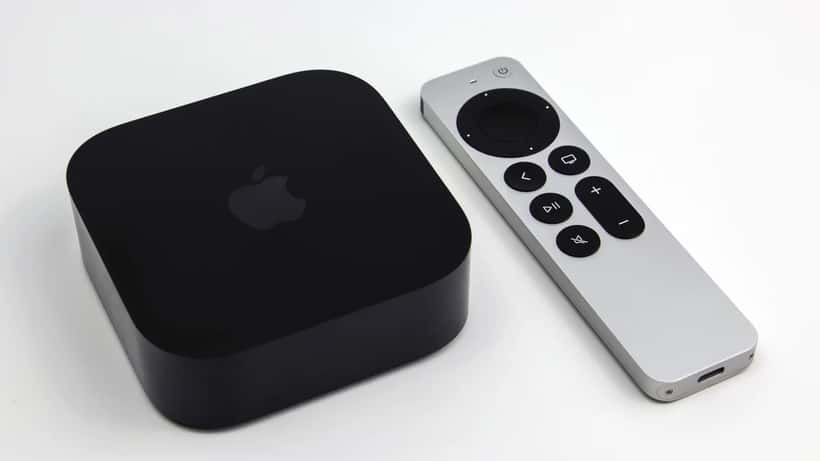
To get the full Silo Season 3 experience — Dolby Vision picture and Atmos audio — you need either the Apple TV 4K (3rd generation, 2022 or later) or a smart TV with a certified Apple TV+ app that supports Dolby Vision.
The catch: not every smart TV app delivers the same quality. Some older Samsung, LG, and Sony models only stream at 1080p through the Apple TV+ app even if the TV panel itself is 4K. The bottleneck is usually a software limitation in the app version, not the display — and manufacturers rarely advertise this clearly.
This is exactly the kind of problem that sounds simple but can take an entire evening to diagnose alone, especially when manufacturer support lines route you through unhelpful automated menus.
Four Signs You Need a Consumer Electronics Specialist
Most UK viewers will have Silo up and running without any trouble. But a meaningful share will spend Friday evening troubleshooting rather than watching. Here are the situations where calling a specialist makes more sense than searching Reddit:
1. Your TV shows 4K but the picture still looks soft or washed out. This usually means motion smoothing (sometimes called "cinema mode" or "TruMotion") is interfering with the signal, or that HDR tone mapping is misconfigured. A technician can calibrate display settings correctly in under 30 minutes.
2. Audio is out of sync, or Dolby Atmos isn't activating. Atmos audio requires a compatible soundbar or AV receiver AND correct passthrough settings in both the TV and the streaming device. Getting all three devices to communicate properly often means navigating three separate settings menus simultaneously — a task most engineers resolve in a single visit.
3. You're getting frequent buffering despite having fast broadband. The problem is almost never the broadband speed. It's more likely a congested Wi-Fi channel, a failing router, or a powerline adapter that's degrading signal quality. A Consumer Electronics or IT specialist can run a proper network audit and pinpoint the bottleneck quickly.
4. Your HDMI switch or home cinema setup isn't passing 4K correctly. Multi-device setups — with HDMI switches, projectors, or older AV receivers — are notorious for introducing compatibility issues with newer HDR formats. This is the most common problem for enthusiast home cinema setups, and it rarely resolves itself through firmware updates alone.
The Bigger Picture: Premium Streaming Raises the Bar
Silo Season 3 is part of a broader shift. As Apple, Netflix, and Disney+ invest more heavily in premium productions — mastered in Dolby Vision, encoded with the latest HEVC or AV1 codecs — the gap between what your equipment can theoretically receive and what it actually delivers is growing wider.
A Consumer Electronics specialist doesn't just fix broken devices. They can advise on which smart TV models genuinely support today's formats (not just what's printed on the box), recommend the correct HDMI cables for your specific setup, and help you extract the most from hardware you already own.
With ten weeks of Silo ahead — and season 4 confirmed — getting your setup right before episode 2 drops on Friday, July 10 is worth the investment.
What You Can Do Before Tonight
Run through this quick checklist before hitting play:
- Update your smart TV and Apple TV+ app to the latest available firmware
- Check your HDMI cable is rated for 4K HDR (look for "HDMI 2.0" or "HDMI 2.1" printed on the cable)
- In your TV settings, confirm HDR and Dolby Vision are enabled for streaming content
- If you're on Wi-Fi, try temporarily plugging the TV directly into your router with an Ethernet cable to rule out network issues
If these steps don't resolve your problems — or if you'd rather have everything set up correctly from the start — ExpertZoom connects you with certified Consumer Electronics specialists available for home visits across the UK. A one-hour consultation can turn a frustrating evening into the premium viewing experience you planned.
