 Rhys Morgan
Nintendo Switch 2 pre-orders are selling out in the UK despite a £395.99 price tag, with UK sales jumping 154% month-on-month in March 2026 following the Pokémon Pokopia release. But as hundreds of thousands of devices land under rooftops across Britain, IT and child safety experts are flagging a set of concerns that many parents haven't considered.
The Switch 2 Surge: What's Driving Demand
Nintendo's second-generation Switch — launched in early 2026 — arrived with improved hardware, a new magnetic Joy-Con attachment system, and a rapidly expanding game library. An eShop promotion running until 12 April 2026 offers up to 75% off selected titles, further fuelling demand.
The Nintendo UK president confirmed in February 2026 that a price increase is "not off the table" given global inflation, rising chip costs driven by AI demand, and increased oil prices affecting shipping. Parents buying now are effectively purchasing at the pre-increase price — which explains the current rush.
But the excitement around a new console is precisely the moment when cybersecurity and parental settings tend to get overlooked. You set up the device, hand it to your child, and three months later discover they've been chatting with strangers or racking up in-app purchases.
What IT Experts Recommend Before You Set Up the Switch 2
1. Configure Nintendo Switch Parental Controls immediately — before the first play session
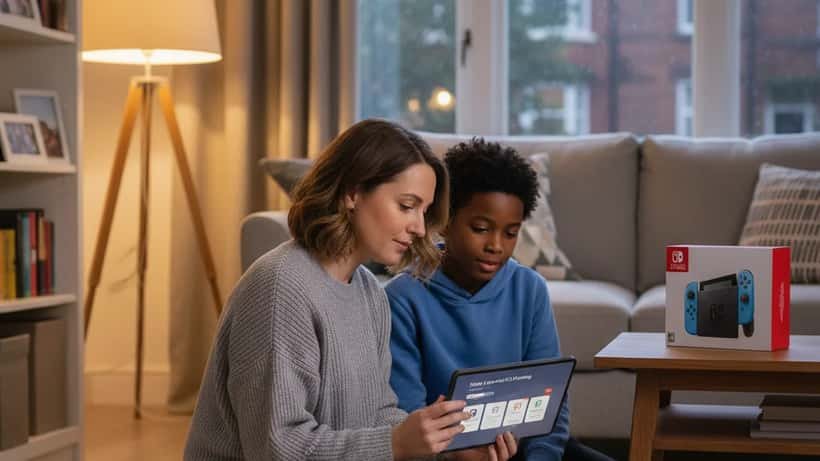
Nintendo offers a free Nintendo Switch Parental Controls app (available on iOS and Android) that allows parents to set daily play time limits, restrict communication with strangers, and receive activity reports. It allows parents to set daily play time limits, restrict communication with strangers, disable online play, and receive activity reports by email.
Key settings to configure:
- Play time limit: Set a daily maximum (30–90 minutes recommended for under-12s)
- Bedtime alarm: Automatically suspends the console at a set time
- Restrict online features: Block or limit communication with non-friends
- Age-appropriate content: The Switch 2 uses PEGI ratings — use the parental controls to enforce these
2. Understand how Nintendo Account online interactions work
Switch 2 games connect to Nintendo's online services, where children can interact with other players. Without restrictions, a child can receive friend requests from anyone, join open game lobbies, and share their Nintendo Network ID publicly.
IT specialists advise treating a new gaming console like a new smartphone: assume all features are public until you explicitly set them to private.
3. Beware of in-app purchases and the Nintendo eShop
The Switch eShop can store payment methods, and many games have downloadable content (DLC) or expansion passes. In March 2026, the UK's Financial Conduct Authority reported a 34% increase in complaints related to unauthorised in-app purchases made by children on gaming platforms. Password-protecting any purchasing function should be a default step, not an afterthought.
According to the UK Safer Internet Centre, children who play online games without supervision or safety settings are significantly more likely to encounter inappropriate content or contact from unknown adults.
4. Screen time and sleep: the data parents should know
The NHS recommends that children aged 5–17 should have no more than two hours of recreational screen time per day, with screens off at least one hour before bed. Gaming — especially competitive online play — is associated with increased cortisol levels and shorter sleep duration when played in the evening.
The Switch 2 Parental Controls app includes a monthly report showing how many minutes per day your child played each game. Many parents are surprised by the actual totals.
YMYL Disclaimer
The health and digital safety information above is general guidance. For personalised advice on child digital safety or screen time management, consult a qualified IT specialist or child health professional.
When to Ask an IT Specialist
Most parental control setups are straightforward enough to do yourself using Nintendo's free tools and the UK Government's guidance via Internet Matters. However, if you're managing multiple devices across a household, have concerns about your child's existing online interactions, or want a full household digital safety audit — an IT consultant can help you design a coherent approach.
On Expert Zoom, you can speak directly with IT specialists who advise families on safe digital environments. Whether you're setting up a new device or reviewing your existing setup, professional guidance can make the difference between digital tools that educate and entertain versus ones that drain time and expose children to risk.
The Nintendo Switch 2 is a brilliant piece of technology. It's also a gateway to the internet — and the same rules that apply to any connected device apply here too. A 20-minute setup session with the right parental controls app can prevent months of problems. Don't skip it in the excitement of unboxing.
And if you're unsure where to start, or want a professional to walk you through the settings, that option is now just a few clicks away.
